> ## Documentation Index
> Fetch the complete documentation index at: https://docs.jsonify.com/llms.txt
> Use this file to discover all available pages before exploring further.
# Tutorial 6: Handling Diverse Website Structures
> Build an advanced multi-level workflow to handle different types of website navigation (standard vs. JavaScript) and merge the results.
This tutorial demonstrates one of the most powerful features of Jsonify: building a **multi-level workflow**. We will tackle a common real-world problem: scraping sugar content information from the menus of different fast-food chains (McDonald's and Wendy's).
The challenge is that each website uses a different navigation structure. McDonald's uses standard links and spoilers, while Wendy's might use JavaScript-driven navigation for its menu items. By creating parallel execution rows, we can build a single workflow that handles both scenarios and combines the data into one clean, final list.
## Goal
To scrape the `item_name` and `sugar_grams` from the menu category pages of McDonald's and Wendy's. The key challenge is that each site requires a different automation approach:
1. **McDonald's (Standard Site):** We will find all product links, follow them, and then click a spoiler to reveal nutritional information.
2. **Wendy's (JavaScript Site):** We will use the `Open sub-pages` block to navigate the menu, as direct links might not be available.
## Key Blocks Used
* `Open datasets` (Input)
* `Layout` menu (`Add new row`, `Link actions`)
* `Find Links` (Transform)
* `Follow Links` (Input)
* `Open sub-pages` (Transform)
* `Interact with Page` (Transform)
* `Extract Data` (Transform)
## What You'll Learn
* How to structure your input data to handle different automation scenarios.
* How to use the **Layout** menu to create parallel execution branches.
* How to build different automation logics for different types of websites.
* How to link and merge the results from parallel branches into a single, unified `Extract Data` block.
## Steps
### 1. Prepare Your Input Data
The key is to prepare your data to guide each branch.
* Create a new workflow and start with an **`Open datasets`** block.
* Inside the dataset, create two columns: `URL` and `contain`.
* The `URL` column will hold the links to the menu category pages.
* The `contain` column will hold a text snippet that is unique to the product links on that site, which helps the `Find Links` block.
### 2. Build the First Row (McDonald's - Standard Navigation)
This branch will handle the McDonald's links.
1. Start with an `Open datasets` block containing the data from the table after.
| URL | contain |
| -------------------------------------------------------- | --------- |
| `https://www.mcdonalds.com/gb/en-gb/menu/whats-new.html` | /product/ |
| `https://www.mcdonalds.com/gb/en-gb/menu/burgers.html` | /product/ |
2. Add a **`Find Links`** block. Configure it with a dynamic goal: `Find all links to each product's page that must contain '{{contain}}'`. This uses the variable from our dataset.
3. Add a **`Follow Links`** block next. Configure it to `Follow each link` found by the previous step.
4. Add an **`Interact with Page`** block to click the spoiler. Configure it with the action: `Click on "Nutritional Information"`.
### 3. Add a Parallel Row
Now we'll create the separate branch for Wendy's.
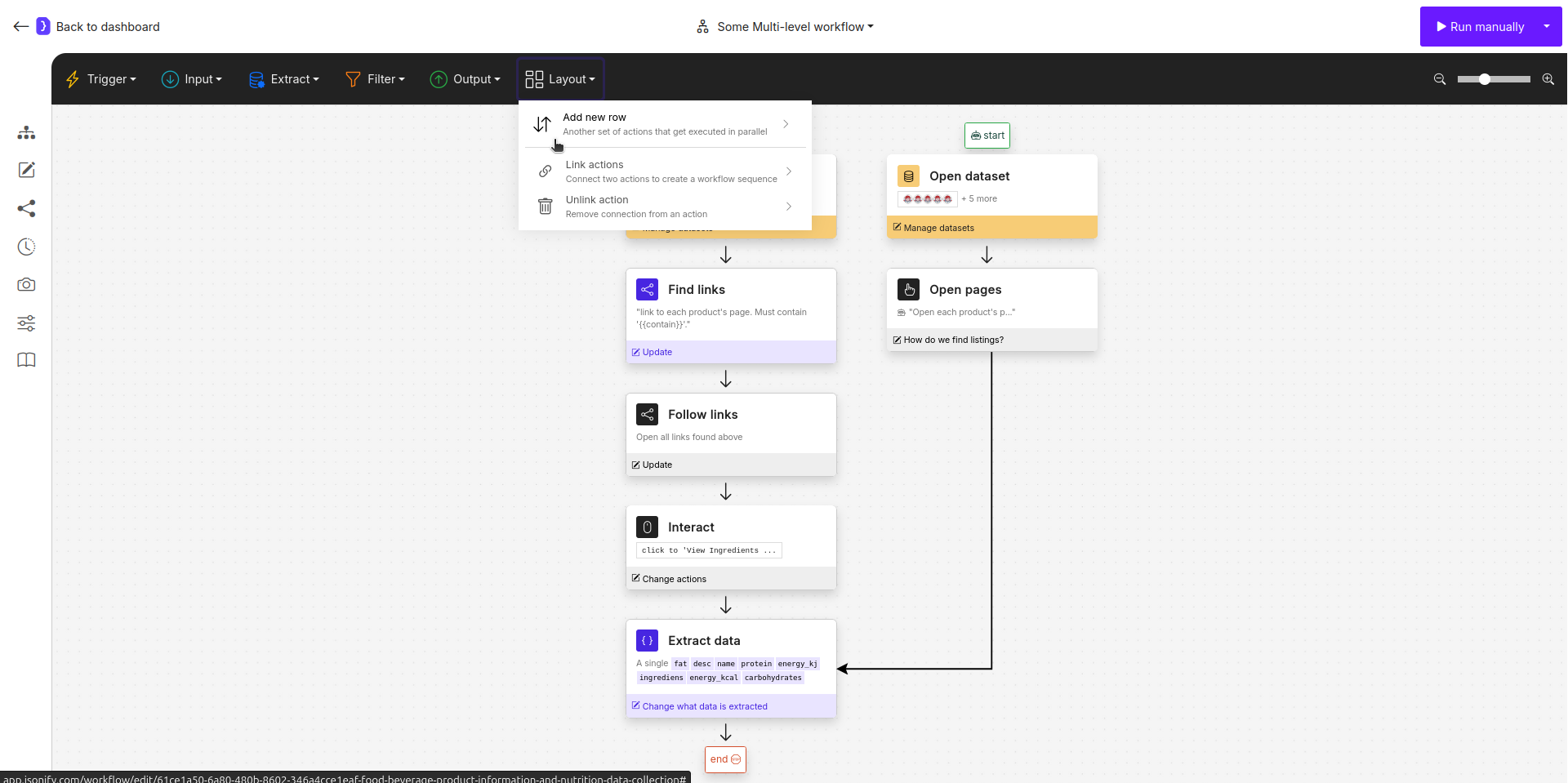
1. Click on the **`Layout`** menu in the top action bar.
2. Select **`Add new row`**. A new "start" placeholder will appear on your canvas. Add `Open datasets` block from the top menu.
### 4. Build the Second Row (Wendy's - JavaScript Navigation)
1. Select the new `Open datasets` block. It will use the **same data** as the first one.
| URL |
| ------------------------------------------------------------------ |
| `https://order.wendys.com/category/100/hamburgers?lang=en_US` |
| `https://order.wendys.com/category/149/english-muffins?lang=en_US` |
2. Add an **`Open sub-pages`** block after it. This block will handle the JavaScript-driven menu.
* **What pages do you want to open?:** `open each menu item on the page`
* **How many pages to extract?:** Set a reasonable limit, e.g., `20`.
### 5. Link and Merge the Branches
Now, we will direct the output of both branches into a single, final `Extract Data` block. This block will have the final context from whichever branch was active for a given input row.
1. Click on the **`Layout`** menu and select **`Link actions`**.
2. Click on the **`Open sub-pages`** block (the last block of Row 2), then click on the **`Extract Data`** block, it's at the end of the first brunch. Now, second branch feed into it.
 ### 6. Configure the Final `Extract Data` Block
This block will now receive the final product page from *either* of the two branches.
* Select the final `Extract Data` block.
* **What information...?:** Choose `A single item`.
* **Attributes:** Define a single, unified schema that works for both McDonald's and Wendy's product pages.
| NAME | DESCRIPTION |
| ------------- | ---------------------------------- |
| `item_name` | `` |
| `sugar_grams` | `` |
### 7. Run and Check Results
* Run the workflow. The agent will process each row from your dataset. It will intelligently choose the correct path based on which blocks can execute.
* The final output will be a single, clean list of menu item names and their sugar content, collected from both websites.
**Congratulations!** You have successfully built a multi-level workflow to handle real-world variations in website design.
### 6. Configure the Final `Extract Data` Block
This block will now receive the final product page from *either* of the two branches.
* Select the final `Extract Data` block.
* **What information...?:** Choose `A single item`.
* **Attributes:** Define a single, unified schema that works for both McDonald's and Wendy's product pages.
| NAME | DESCRIPTION |
| ------------- | ---------------------------------- |
| `item_name` | `` |
| `sugar_grams` | `` |
### 7. Run and Check Results
* Run the workflow. The agent will process each row from your dataset. It will intelligently choose the correct path based on which blocks can execute.
* The final output will be a single, clean list of menu item names and their sugar content, collected from both websites.
**Congratulations!** You have successfully built a multi-level workflow to handle real-world variations in website design.