> ## Documentation Index
> Fetch the complete documentation index at: https://docs.jsonify.com/llms.txt
> Use this file to discover all available pages before exploring further.
# Find Links
> Instruct your AI Agent to identify and extract specific URLs from the current webpage for navigation or data collection.
The `Find Links` block is a straightforward yet essential tool that allows your AI Agent to locate and collect URLs (links) present on the current webpage based on your criteria. This is particularly useful when the agent is on a page listing multiple items (like products, articles, or companies) and you need it to navigate to individual item pages or find a specific target link.
If interactive elements like buttons on a page are implemented as actual links (i.e., hovering over them shows a URL in the browser's status bar), using `Find Links` to target these URLs for navigation is often faster and more precise than using the `Interact with Page` block, as `Find Links` is specifically optimized for URL discovery.
## Purpose
Use the `Find Links` block when you want your AI Agent to:
* Identify all links leading to individual product pages from a category listing.
* Find links to company profile pages on a directory site.
* Locate a specific link based on its anchor text, URL pattern, or other criteria (e.g., "Find link to 'Privacy Policy'", "Find all links that must contain 'example.com/product-details'").
* Gather all URLs from a search results page for further processing or navigation.
This block acts as a specialized finder for URLs. The found URLs are then typically passed to other blocks, most commonly `Follow Links`, for subsequent actions.
## Configuration
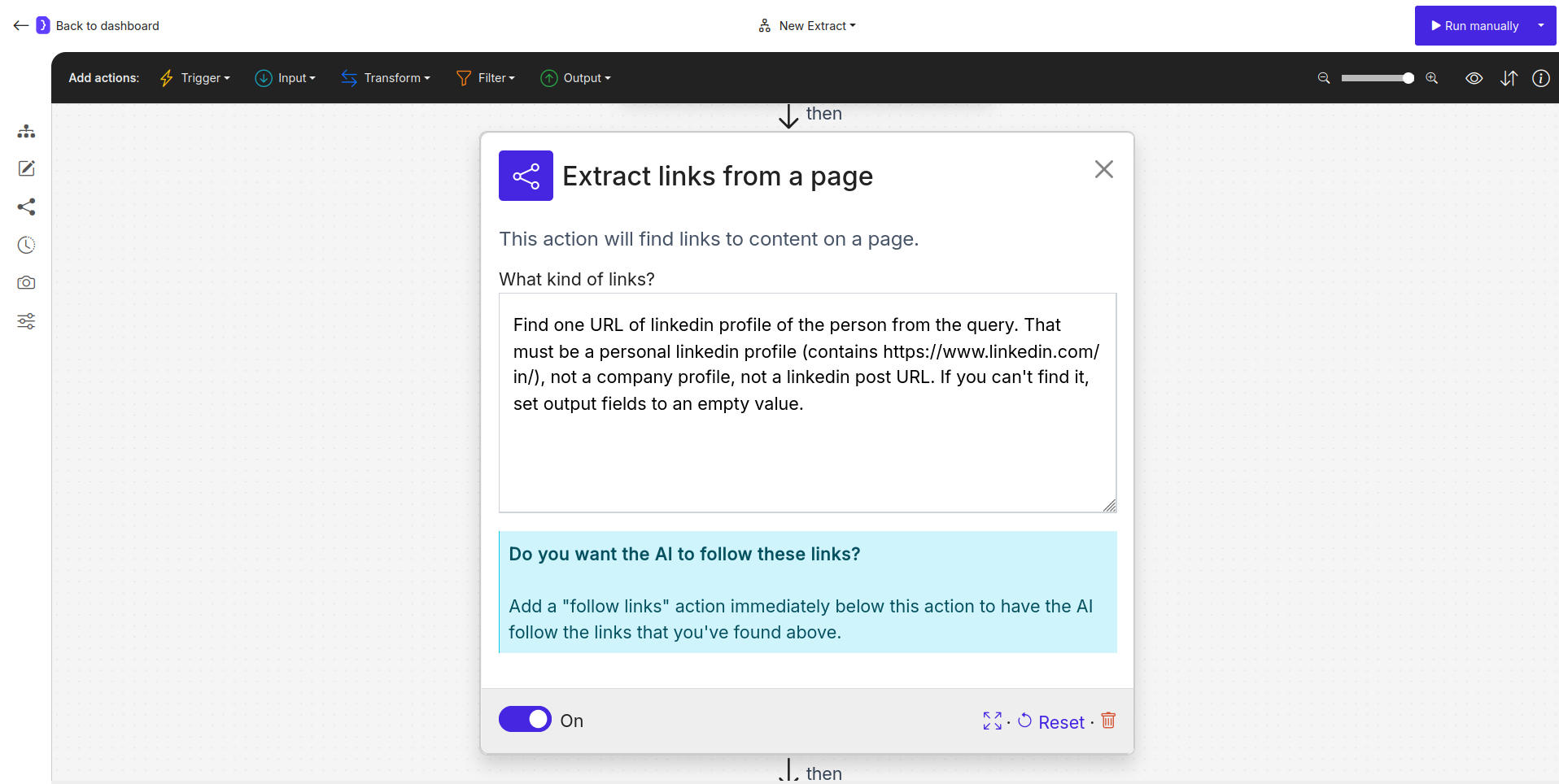
1. **What kind of links?**
* This is the primary text field where you describe the links the agent should find on the current page.
* Your description should be clear and indicative of the target URLs. You can include examples, patterns, and constraints.
* Examples:
* `Find links to each company's pages`
* `Find links to articles in the list that must contain 'example.com/blog/'`
* `Find the link with text 'View Details'`
* `Find all links to PDF documents, for example, ending with .pdf`
* You can use variables here if your criteria for finding links are dynamic. For example: `Find link to user profile for {{username}}`
2. **Do you want the AI to follow these links?**
* This is a prompt often displayed within the block's UI.
* Simply finding links doesn't mean the agent will navigate to them. To do that, you **must** add a `Follow Links` block immediately after this `Find Links` block. Using `Find Links` by itself typically serves no purpose, as the collected links won't be acted upon.
 ## Examples
**Example 1: Navigating to Individual Company Pages from a List**
Let's say the agent is on a webpage listing several companies (e.g., `ycombinator.com/companies`).
1. **`Find Links` Block:**
* **What kind of links?:** `Find links to each company's page`
2. **`Follow Links` Block (added next):**
* **Which links to follow?:** "Follow each link found"
* *Result:* The agent will first identify all links on the current page that lead to individual company pages. Then, the `Follow Links` block will instruct the agent to navigate to each of those found URLs.
**Example 2: Finding a Specific Document Link with a Pattern**
* Agent is on a general support page.
* **`Find Links` Block:**
* **What kind of links?:** `Find the link to the "Terms of Service" document, must contain '.pdf'`
* **`Follow Links` Block (added next):**
* **Which links to follow?:** "Follow the first link found"
* *Result:* The agent finds the specific link matching the text and pattern, then navigates to it.
## Key Considerations
* **Specificity and Patterns:** The clearer your description, including any necessary patterns or constraints (like "must contain..."), the more accurately the agent will find the desired links.
* **Mandatory `Follow Links` for Navigation:** This block *only finds* URLs. To actually visit them, it **must** be paired with a `Follow Links` block placed immediately after it. Using `Find Links` in isolation without a subsequent action on the links is generally not useful.
* **Context Matters:** The agent searches for links on the page it is currently on. Ensure your workflow navigates to the correct page *before* this block is executed.
* **Priority over `Interact` for Link-Buttons:** If a button or clickable element is a true hyperlink, using `Find Links` (followed by `Follow Links`) is often more efficient and reliable for navigation than using `Interact with Page` to simulate a click.
* **Output:** The output of this block is typically a list of URLs, which becomes the input for the subsequent `Follow Links` block.
The `Find Links` block is a simple but crucial component for creating workflows that involve navigating through multiple pages or drilling down into specific items from a list.
## Examples
**Example 1: Navigating to Individual Company Pages from a List**
Let's say the agent is on a webpage listing several companies (e.g., `ycombinator.com/companies`).
1. **`Find Links` Block:**
* **What kind of links?:** `Find links to each company's page`
2. **`Follow Links` Block (added next):**
* **Which links to follow?:** "Follow each link found"
* *Result:* The agent will first identify all links on the current page that lead to individual company pages. Then, the `Follow Links` block will instruct the agent to navigate to each of those found URLs.
**Example 2: Finding a Specific Document Link with a Pattern**
* Agent is on a general support page.
* **`Find Links` Block:**
* **What kind of links?:** `Find the link to the "Terms of Service" document, must contain '.pdf'`
* **`Follow Links` Block (added next):**
* **Which links to follow?:** "Follow the first link found"
* *Result:* The agent finds the specific link matching the text and pattern, then navigates to it.
## Key Considerations
* **Specificity and Patterns:** The clearer your description, including any necessary patterns or constraints (like "must contain..."), the more accurately the agent will find the desired links.
* **Mandatory `Follow Links` for Navigation:** This block *only finds* URLs. To actually visit them, it **must** be paired with a `Follow Links` block placed immediately after it. Using `Find Links` in isolation without a subsequent action on the links is generally not useful.
* **Context Matters:** The agent searches for links on the page it is currently on. Ensure your workflow navigates to the correct page *before* this block is executed.
* **Priority over `Interact` for Link-Buttons:** If a button or clickable element is a true hyperlink, using `Find Links` (followed by `Follow Links`) is often more efficient and reliable for navigation than using `Interact with Page` to simulate a click.
* **Output:** The output of this block is typically a list of URLs, which becomes the input for the subsequent `Follow Links` block.
The `Find Links` block is a simple but crucial component for creating workflows that involve navigating through multiple pages or drilling down into specific items from a list.